Steps to create a dependent value set in
Oracle Apps
In order to create a value set which is dependent on another valueset do the following steps:
1. Create a valueset which is the parent valueset.
2. Create a child valueset whose value is fetched after selecting a value of the parent valueset.
A complete example of the dependent valueset creation is done as follows:
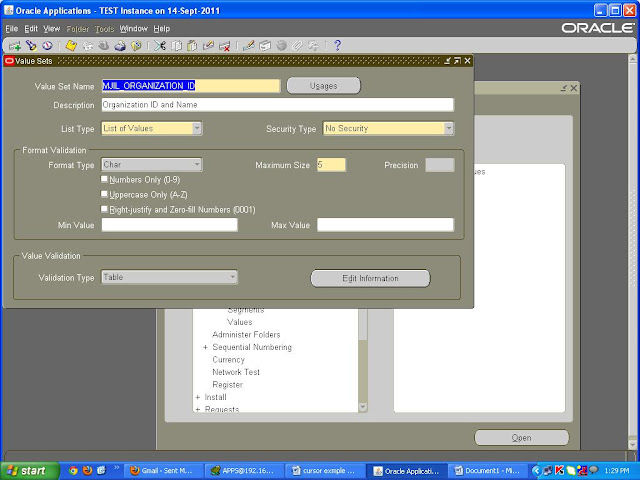
1. Create a parent valueset.
Value Set Name: MJIL_ORGANIZATION_ID
Validation Type: Table
Maximum Size: 5
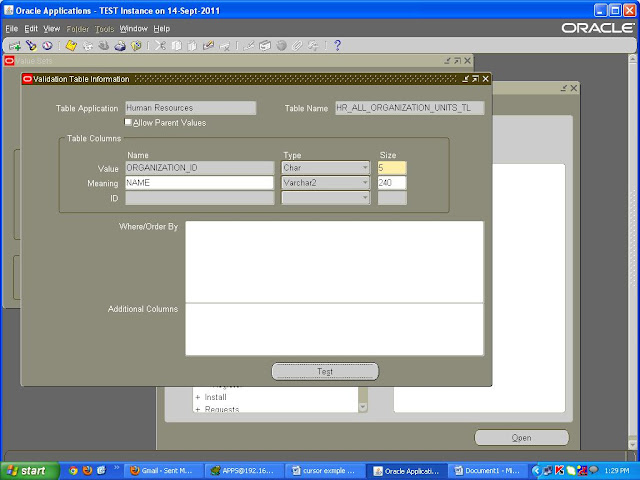
Edit Information:-
Table Application: Human Resources
Table Name: HR_ALL_ORGANIZATION_UNITS_TL
Table Columns Value: ORGANIZATION_ID
Type: Char
Size: 5
Table Columns Meaning: Name
Type: VarChar2
Size: 240
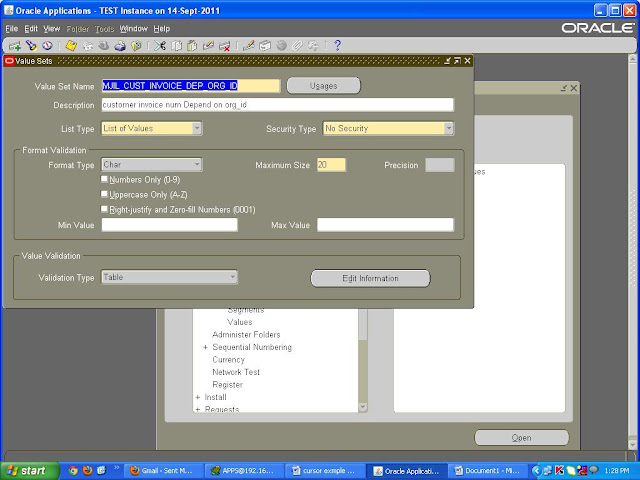
2. Create another valueset which is dependent on the previous valueset.
Value Set Name: MJIL_CUST_INVOICE_DEP_ORG_ID
Validation Type: Table
Maximum Size: 20
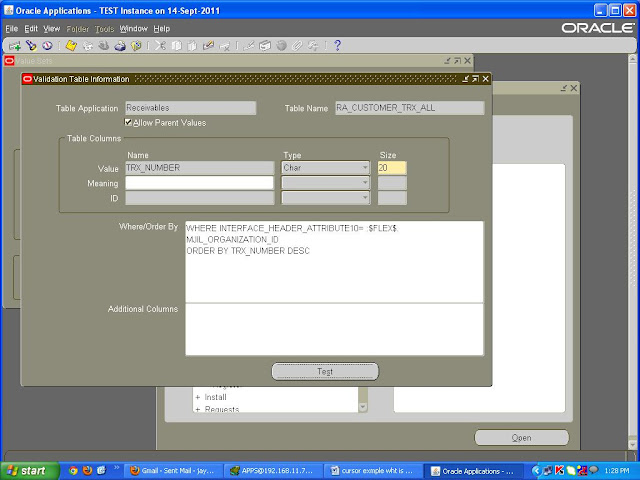
Edit Information:-
Table Application: Receivables
Table Name: RA_CUSTOMER_TRX_ALL
Table Columns Value: TRX_NUMBER
Type: Char
Size: 20
Where/Order By
WHERE INTERFACE_HEADER_ATTRIBUTE10=:$FLEX$.MJIL_ORGANIZATION_ID
ORDER BY TRX_NUMBER DESC
1. Create a valueset which is the parent valueset.
2. Create a child valueset whose value is fetched after selecting a value of the parent valueset.
A complete example of the dependent valueset creation is done as follows:
1. Create a parent valueset.
Value Set Name: MJIL_ORGANIZATION_ID
Validation Type: Table
Maximum Size: 5
Edit Information:-
Table Application: Human Resources
Table Name: HR_ALL_ORGANIZATION_UNITS_TL
Table Columns Value: ORGANIZATION_ID
Type: Char
Size: 5
Table Columns Meaning: Name
Type: VarChar2
Size: 240

2. Create another valueset which is dependent on the previous valueset.
Value Set Name: MJIL_CUST_INVOICE_DEP_ORG_ID
Validation Type: Table
Maximum Size: 20
Edit Information:-
Table Application: Receivables
Table Name: RA_CUSTOMER_TRX_ALL
Table Columns Value: TRX_NUMBER
Type: Char
Size: 20
Where/Order By
WHERE INTERFACE_HEADER_ATTRIBUTE10=:$FLEX$.MJIL_ORGANIZATION_ID
ORDER BY TRX_NUMBER DESC


